Cluster Architecture
Scale Frontier horizontally to handle millions of connections using Frontlas.
While a standalone Frontier instance is powerful, production environments requiring High Availability (HA) and horizontal scaling should deploy the Frontier + Frontlas cluster architecture.
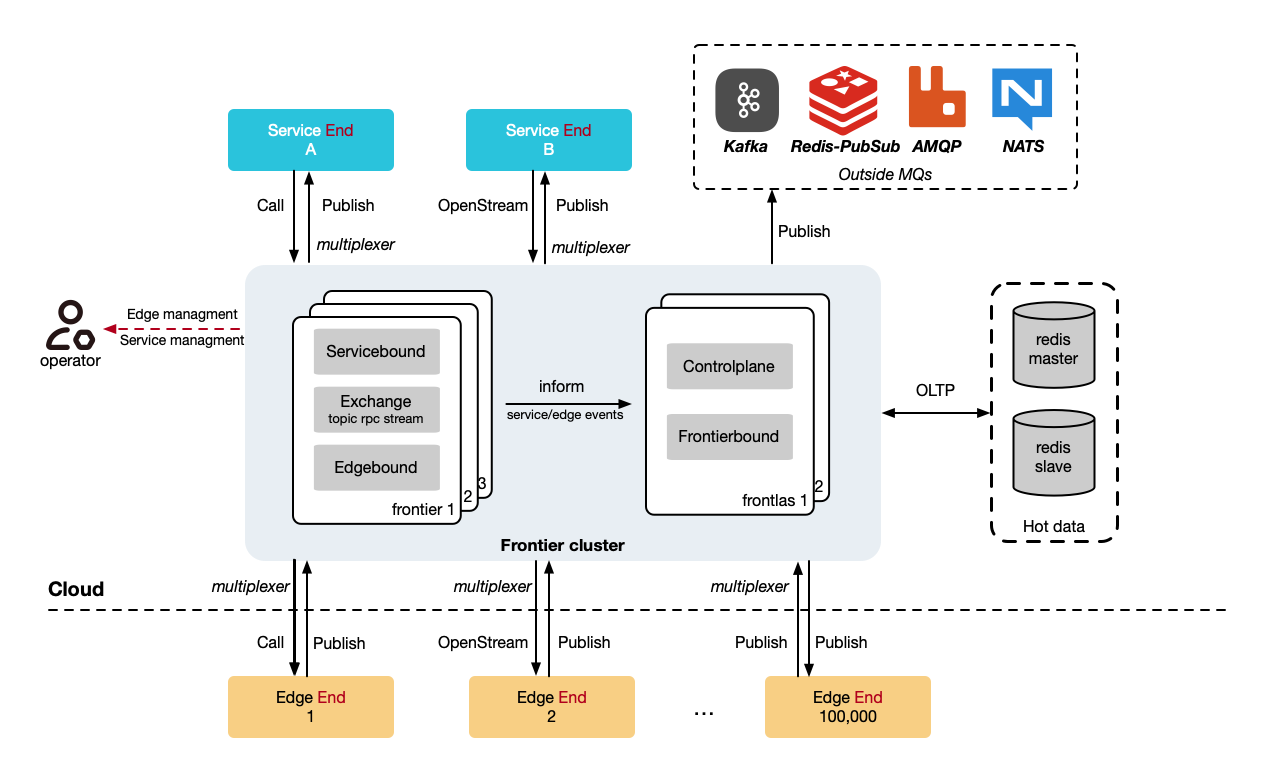
What is Frontlas?
Frontlas (Frontier Atlas) is a stateless cluster management component. It acts as the registry and control plane for multiple Frontier gateway instances.
- Stateless: Frontlas does not store state in memory. It uses Redis to maintain metadata and active connection states.
- Port 40011: Microservices connect here to discover available Edge nodes across the entire cluster.
- Port 40012: Frontier instances connect here to report their status and the status of edges connected to them.
How it works
- You can deploy any number of Frontier instances.
- Each Frontier instance connects to Frontlas to report heartbeat and metadata.
- Edge nodes connect to any available Frontier instance (usually balanced by a load balancer or NodePort).
- Microservices query Frontlas to find out which Frontier instance currently holds the connection to the target Edge node, and then establishes communication.
Cluster Configuration
1. Frontier Configuration
In your frontier.yaml, enable Frontlas and set the instance ID:
frontlas:
  enable: true
  dial:
    network: tcp
    addr:
      - 127.0.0.1:40012

daemon:
  # Must be unique within the cluster
  frontier_id: frontier01
2. Frontlas Configuration
Configure frontlas.yaml to point to your Redis instance:
control_plane:
  listen:
    network: tcp
    addr: 0.0.0.0:40011

frontier_plane:
  listen:
    network: tcp
    addr: 0.0.0.0:40012

redis:
  mode: standalone # Supports standalone, sentinel, and cluster
  standalone:
    network: tcp
    addr: redis:6379
    db: 0
Updating Microservices for Cluster Mode
When running in cluster mode, microservices must initialize using NewClusterService pointing to Frontlas, rather than pointing to a single Frontier instance.
package main

import (
    "github.com/singchia/frontier/api/dataplane/v1/service"
)

func main() {
    // Point to Frontlas (Port 40011) instead of Frontier (Port 30011)
    svc, err := service.NewClusterService("127.0.0.1:40011")

    // The rest of the usage remains exactly the same!
    // svc.Publish(...)
    // svc.Call(...)
}